It shows you first
Most save buttons are a black box. Sorrel puts the recipe in an editor you can type in — title, prep, cook and total time, servings, every ingredient, every step — and tells you which parts it read off the page.
 Sorrel
Chrome & Edge · Free
One click in the browser, and it is in your library and on your phone. Sorrel reads the page, leaves the nine hundred words about Tuscany behind, and shows you what it found before anything is saved.
Free · No account needed · Nothing saved until you press the button
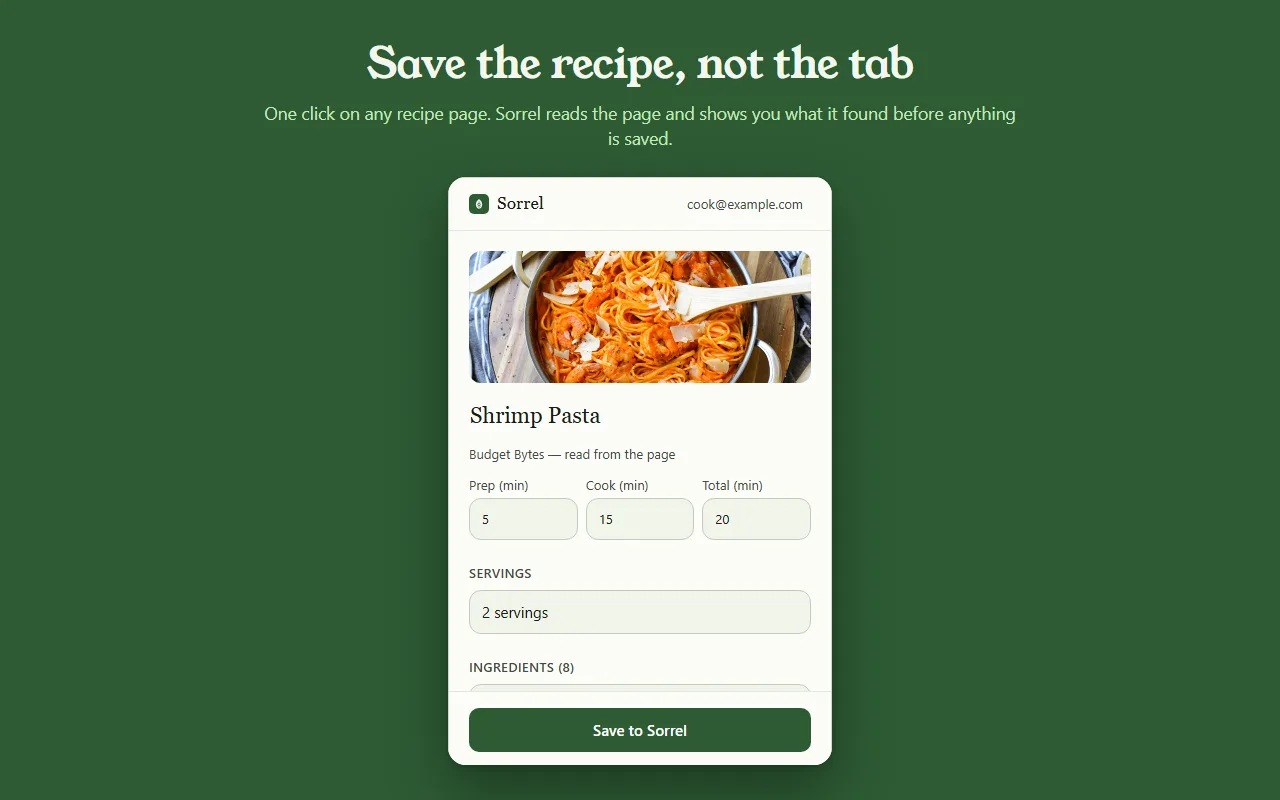
Eine Vorschau auf das Echte — nichts verlässt diese Seite.
Most save buttons are a black box. Sorrel puts the recipe in an editor you can type in — title, prep, cook and total time, servings, every ingredient, every step — and tells you which parts it read off the page.
Some sites bury the recipe in a widget. When Sorrel cannot read all of it, it says so, shows you what it did get, and lets you finish the job — here, or later on your phone.
Open a page you saved months ago and Sorrel tells you, by name, instead of quietly making a second copy. It keeps a small index of your own library in the browser to answer that without asking the network.
No account? No problem.
Not signed in, Sorrel hands you a QR code. Point your phone at it and the app opens the recipe and adds it to your library. No email, nothing to join, and the link keeps working for 30 days.
This is not a teaser with a countdown on it. It is a real way to use the extension for as long as you like, and it never asks you for anything.

In Sorrel on your phone, ask for a code and type it into the extension. A saved recipe is then in your library within seconds — in the browser, on your phone, and in the household you share a cookbook with. Sync is part of Sorrel Pro.

It declares no match patterns for any site and cannot read a page you have not invoked it on. Page access comes from your click alone. It talks to one server — api.sorrelapp.io — and there are no analytics, no telemetry and no third-party endpoints.
Ja — Sorrel ist ein kostenloser Rezept-Speicher, der sich in Chrome installiert und in jedem Chromium-Browser wie Edge, Brave oder Arc. Öffne eine Rezeptseite, klick aufs Blatt in deiner Symbolleiste, und Sorrel liest das Rezept, zeigt dir, was es gefunden hat, und speichert es — auf deinem Handy ebenso wie in deinem Browser.
Nein. Abgemeldet reicht dir die Erweiterung einen QR-Code — richte dein Handy darauf, und das Rezept öffnet sich in der Sorrel-App. Meld dich später mit einem sechsstelligen Code an, und gespeicherte Rezepte synchronisieren sich automatisch aufs Handy. So oder so gibt es nichts zu registrieren.
Jede Rezeptseite — ein Foodblog, eine Zeitung, einen Händler. Sorrel holt den Titel, das Foto, die Zeiten, die Zutaten und die Zubereitung heraus und lässt die Lebensgeschichte und die Werbung zurück. Wenn eine Seite einen Teil des Rezepts verbirgt, zeigt es dir, was es bekommen hat, und lässt dich den Rest mit einem Tippen ergänzen.
Die Erweiterung ist kostenlos, ohne Werbung und ohne Tracking. Sie spricht mit einem Server — api.sorrelapp.io — und beansprucht keinen Zugriff auf irgendeine Seite, bis du klickst. Das Speichern in deiner Bibliothek und das Synchronisieren aufs Handy gehören zu Sorrel; ein Abo brauchst du nur für Dinge wie den Video-Import.
Chrome und Edge heute, und die darauf aufbauenden Chromium-Browser — Brave, Arc, Opera und Vivaldi. Du installierst sie einmal aus dem Chrome Web Store, und sie funktioniert in allen gleich.
Free · Chrome and Edge · No account needed