It shows you first
Most save buttons are a black box. Sorrel puts the recipe in an editor you can type in — title, prep, cook and total time, servings, every ingredient, every step — and tells you which parts it read off the page.
 Sorrel
Chrome & Edge · Free
One click in the browser, and it is in your library and on your phone. Sorrel reads the page, leaves the nine hundred words about Tuscany behind, and shows you what it found before anything is saved.
Free · No account needed · Nothing saved until you press the button
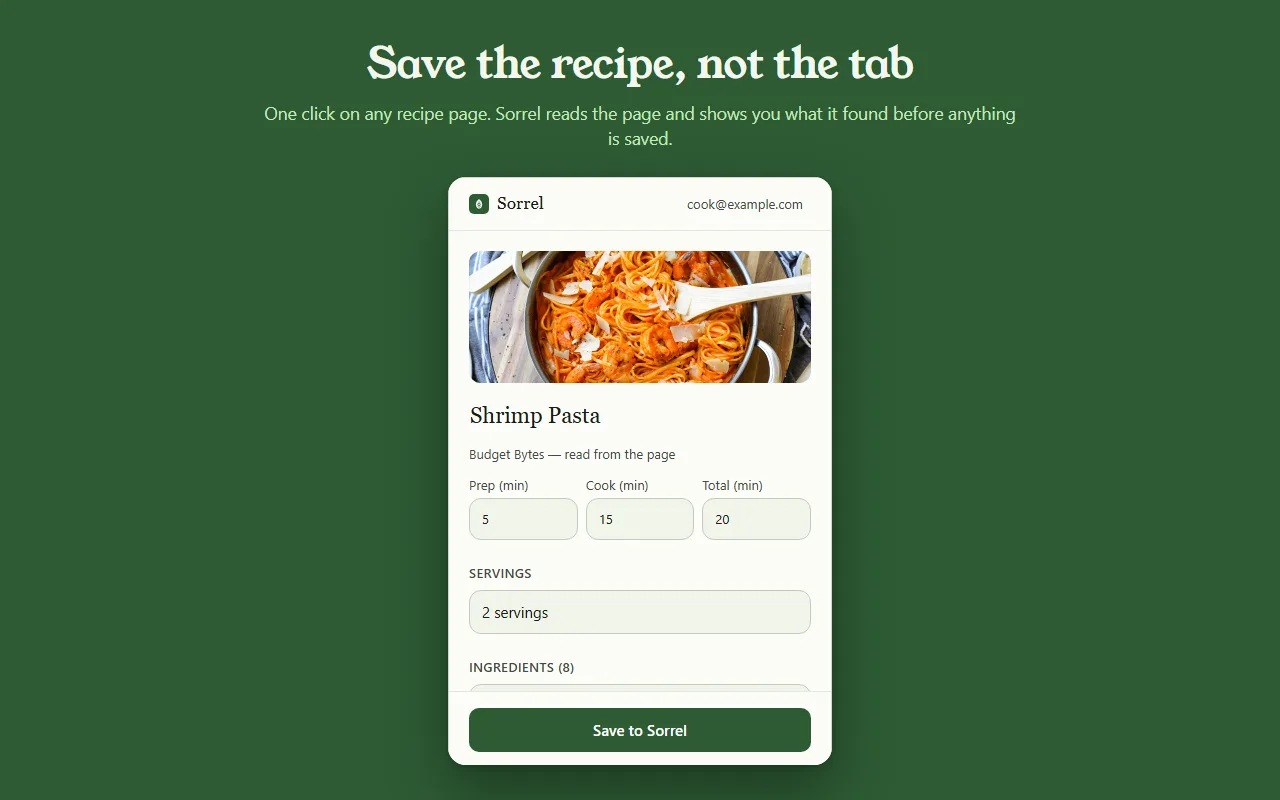
실제 동작의 미리보기입니다 — 이 페이지를 벗어나는 것은 없습니다.
Most save buttons are a black box. Sorrel puts the recipe in an editor you can type in — title, prep, cook and total time, servings, every ingredient, every step — and tells you which parts it read off the page.
Some sites bury the recipe in a widget. When Sorrel cannot read all of it, it says so, shows you what it did get, and lets you finish the job — here, or later on your phone.
Open a page you saved months ago and Sorrel tells you, by name, instead of quietly making a second copy. It keeps a small index of your own library in the browser to answer that without asking the network.
No account? No problem.
Not signed in, Sorrel hands you a QR code. Point your phone at it and the app opens the recipe and adds it to your library. No email, nothing to join, and the link keeps working for 30 days.
This is not a teaser with a countdown on it. It is a real way to use the extension for as long as you like, and it never asks you for anything.

In Sorrel on your phone, ask for a code and type it into the extension. A saved recipe is then in your library within seconds — in the browser, on your phone, and in the household you share a cookbook with. Sync is part of Sorrel Pro.

It declares no match patterns for any site and cannot read a page you have not invoked it on. Page access comes from your click alone. It talks to one server — api.sorrelapp.io — and there are no analytics, no telemetry and no third-party endpoints.
네 — Sorrel은 Chrome에, 그리고 Edge, Brave, Arc 같은 어떤 Chromium 브라우저에든 설치되는 무료 레시피 저장 도구입니다. 레시피 페이지를 열고 도구 모음의 잎을 누르면, Sorrel이 레시피를 읽고, 찾아낸 것을 보여 주고, 브라우저뿐 아니라 휴대폰에도 함께 저장합니다.
아닙니다. 로그아웃 상태에서는 확장 프로그램이 QR 코드를 건네줍니다 — 휴대폰을 대면 Sorrel 앱에서 레시피가 열립니다. 나중에 여섯 자리 코드로 로그인하면 저장한 레시피가 휴대폰으로 자동 동기화됩니다. 어느 쪽이든 가입할 것은 없습니다.
어떤 레시피 페이지든 됩니다 — 음식 블로그, 신문, 소매점까지. Sorrel은 제목, 사진, 시간, 재료, 조리 순서를 추려 내고 긴 사설과 광고는 뒤에 남겨 둡니다. 페이지가 레시피 일부를 감춰 두면, 잡아낸 것을 보여 주고 한 번만 눌러 마무리하게 해 줍니다.
확장 프로그램은 무료이며, 광고도 추적도 없습니다. 하나의 서버 — api.sorrelapp.io — 하고만 이야기하고, 당신이 누르기 전에는 어떤 사이트에도 접근 권한을 두지 않습니다. 라이브러리에 저장하고 휴대폰으로 동기화하는 것은 Sorrel의 일부입니다. 구독이 필요한 것은 영상 가져오기 같은 기능뿐입니다.
지금은 Chrome과 Edge, 그리고 그 위에 만들어진 Chromium 브라우저들 — Brave, Arc, Opera, Vivaldi — 에서 됩니다. Chrome Web Store에서 한 번 설치하면 그 모두에서 똑같이 동작합니다.
Free · Chrome and Edge · No account needed